Everything here is free — no email required.
New here? Read in this order — each one builds on the last:
The cheap, scratch-built path into the hobby — the same approach from the YouTube channel. Start at the top and work down.
The complete beginner path — what to buy, the cheap first-plane approach, and how to actually learn to fly without wasting money.
Read the guide → NewThe ready-to-fly planes I'd actually hand a first-time pilot — ranked, with honest pros and cons, plus the $1 plane you build yourself.
See the picks →Motor, ESC, receiver, battery, servos — what each part does, how they connect, and what the specs mean. In plain English.
Read the guide →Exactly what you need to start scratch-building on a budget — and what to skip. Most of it costs under $50 total.
Read the guide →S counts, mAh, C ratings, safe charging, and storage — understand LiPos so you don't ruin a pack (or start a fire).
Read the guide →Straight answers first, then a mini-tool on every page that works it out for your plane.
ESC, Kv, C-rating, CG, expo — every bit of RC jargon on this site, explained in plain English.
Open the glossary →TRUST, registration, Remote ID, finding a field, wind limits and prop safety — with official sources.
Know before you fly →Mark the dimension four times, channel the second and fourth faces, fold once. Animated, with a marking calculator.
Learn the fold →XT60, Deans, EC3, IC3, JST — identify any RC battery connector by shape and color, and fix the doesn't-fit-my-charger problem.
Identify my plug →That's trim. Pick what the plane is doing and get the exact click, which way, and the after-landing fix that makes it stick.
Trim it out →Bind, channel order, the stand-behind-the-plane reversing test, starting rates and expo, throttle cut — in the order that prevents crashes.
Set up the radio →25–30% of the mean aerodynamic chord back from the leading edge — enter your chord and get the balance point in inches.
Get the number →The standard power chain — battery, ESC, motor, receiver, servos — labeled and printable.
See the diagram →Tap your wingspan and get the matched power-system combo I actually fly, part by part.
Match my parts →Five real builds with their dimensions — from the $1 30-minute plane to the 5-foot cargo hauler.
Browse the plans →The ten parts that build and fly a first plane — exact picks, why each one, about $140–170 all-in.
See the list →Six symptoms cover almost every grounded plane — pick yours and get the cause plus the fix.
Find the fix →Reference material — buyer's guides, identification pages, and the lighting system. Come back whenever you need an answer.
Matched parts and honest buyer's guides — from a beginner's first kit to the high-ticket tools serious builders ask about.
Everything to build and fly your first plane, matched and ready to order in one list.
See the kit →Channels, ecosystems, and the receiver-matching trap — the radios I'd buy first.
Compare radios →What S, mAh, and C mean, how to match a pack to your plane, and the packs I fly.
Compare batteries →What matters for RC, the two Bambu printers I'd buy, and the filament that makes printed parts fly.
Compare printers →Cut perfect balsa & ply rib sets at home — four OMTech machines ranked, with 5% off.
Compare lasers →Wood, acrylic, foam — thickness limits and sheet sizes for OMTech CO2 and the Bambu H2D, plus what's never safe to laser.
See the materials →Controller + matched 12V WS2815 strips + wire and power — the whole lighting kit.
See the kit →Guides teach you the ideas — these tools give you the numbers and diagrams for your exact build. All free, no signup.
Enter wingspan, style, battery, and motor — get CG, wing loading, thrust plan, and a to-scale plan view with a parts list.
Design my airplane →Pick your battery, ESC, receiver, and servos — see a color-coded wiring diagram for your exact setup and the right hookup order.
Show me the wiring →Answer a few questions about your plane and get a complete, buyable parts checklist sized to your build.
Build my checklist →Flight time, wing loading, C-rating max current, and static thrust — the numbers you check most, in seconds.
Run the numbers →See everything in one place on the Free Tools page.
How to light your build the right way — what strips to use, where the lights go, and what to check before you order.
What WS2815 strips are, how they differ from WS2812B, and how to wire and power them safely.
Read the guide →Navigation lights, strobes, and orientation lighting for night flying — what goes where and why.
Read the guide → PDFWhat to look for when buying 12V WS2815 addressable strips — WS2815 vs WS2812B, voltage, density, IP ratings, recommended strips, and the listing red flags to avoid. Free download, no email required.
Download the PDF →Everything for picking strips, wiring the controller, and getting your lights running.
Got the controller? Wire your strips and battery, join the controller's Wi-Fi on your phone, open the browser UI, and pick your first lighting mode — step by step.
View the setup guide →See every mode before you buy — navigation lights, strobes, color chases, rainbow sweeps, hovercraft underglow, and more — animated live in the browser. No download or account needed.
Try the demo →Not sure a specific strip will work? Enter the voltage, chip type, and data protocol and get an instant yes/no with a plain-English reason. Takes 30 seconds — still unsure, send me the product link.
Check my strip →The guides give you the ideas — the tools give you the numbers. Design your plane with real starting numbers, or ask me directly if something here didn't answer it.
One printable page covering what these guides teach: what to buy, how to set up, and the preflight that saves your maiden. I’ll also send new guides and tools as they land. No spam, unsubscribe anytime.
The airplane this site is built around, as plans or cut for you, and the small parts I use on every build.
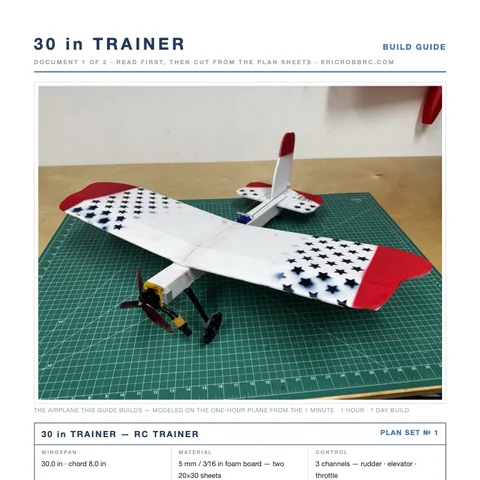 ER Sparrow Mk II Pre-Cut KitEvery foam part laser-cut and scored, the motor mount, the skewers, and the plans. Add your electronics and glue.$29.99See the kit →
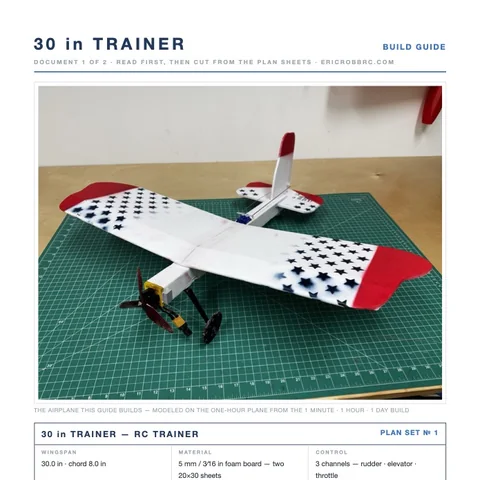 ER Sparrow Mk II PlansTrue-1:1 cutting templates and the 8-page build guide for the 30-inch one-hour trainer. Print at home or at a print shop.$8Get the plans →
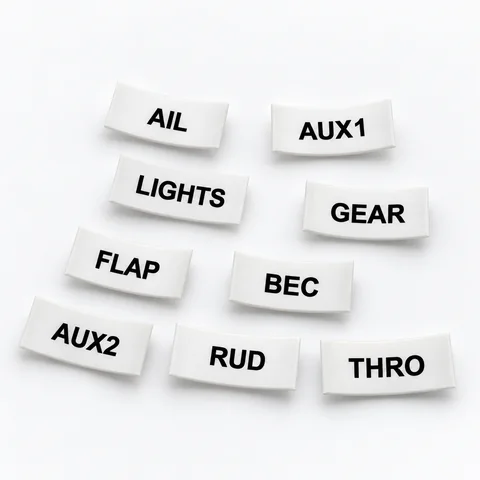 Servo Lead Heat-Shrink LabelsAIL, ELE, RUD, THRO and the rest, shrunk onto the lead so the receiver bay reads itself. Four packs.from $19.99See the label kit →
